
Sidebar 19 block design & features
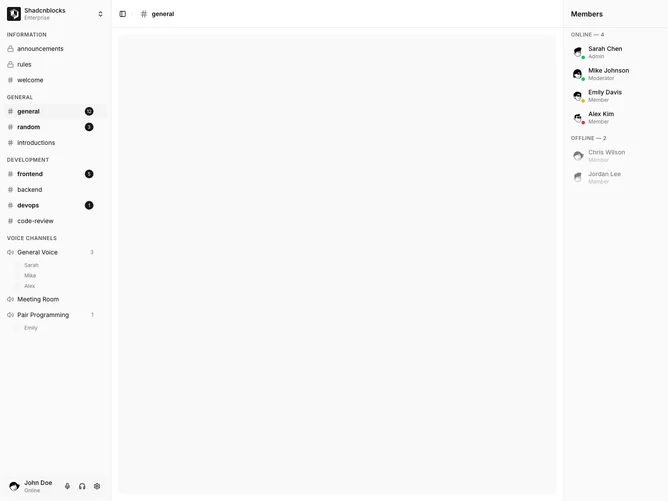
Sidebar19 is a dual-rail chat shell built with Shadcn UI. The left sidebar opens with a workspace switcher, then collapsible channel categories with uppercase labels. Text channels use a hash or lock icon and unread badges. Voice channels list occupants under the row. Hovering a channel reveals an overflow menu for mute, pin, edit, and delete. The footer is a user bar with mute, deafen, and settings tooltips. The center header shows a hash mark and the active channel name (general). The right rail is a sticky Members panel that groups people as Online or Offline, each with avatar, role, and a status dot.
The left rail is denser than the simpler chat sibling: category labels are tracked-out, plus controls appear on hover, and voice occupants indent beneath their channel. The right rail is a quieter list, with offline members dimmed. Status dots use green, yellow, red, and gray. The members column has a titled header and a left border. Surfaces stay in default sidebar tokens.
Aesthetically this is a full chat workspace rather than a single nav column. Dual rails plus presence, unread counts, and hover menus make it one of the more elaborate blocks in the set. Complexity is mixed: layout and hover chrome are code-driven, while channels, occupants, and member rosters are content-driven.
The members rail hides below large breakpoints. The center header uses the channel name instead of Overview and Dashboard crumbs.