
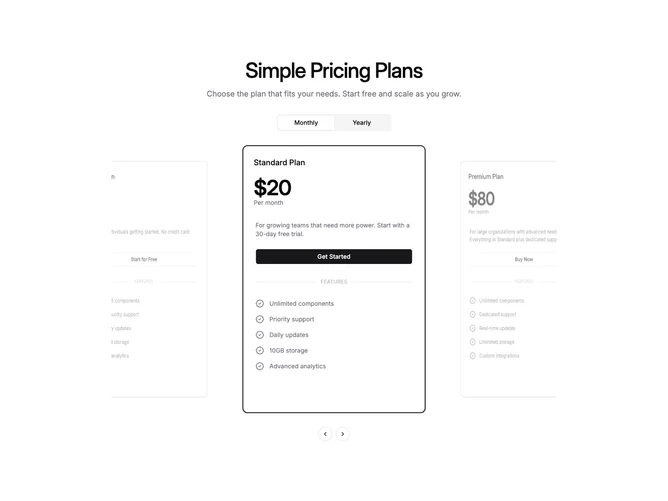
Pricing 98 block design & features
Pricing98 is a four-tier pricing section built with Shadcn UI that presents every plan inside a looping coverflow carousel. A centered headline and description sit above a pill-shaped billing toggle with Monthly and Yearly options. Below the toggle, four plan cards cycle in a perspective-enabled track. Each card contains the plan name, large price figure, billing cadence, a short description that updates with the toggle, a full-width CTA link, a "FEATURES" divider flanked by horizontal rules, and a checklist of included items with badge-check icons. The carousel starts on the highlighted plan when one is marked.
Scroll-linked 3D transforms drive the visual effect. As cards move through the track, they rotate on the Y axis and scale down proportionally to their distance from center, creating a layered depth illusion without any jump on snap. The center card stays fully opaque with no tilt, while neighbors recede with increasing rotation and reduced opacity. A primary-colored border and solid button distinguish whichever card currently occupies the focal position, independent of source markup. Shadows on the active card reinforce its front-of-stack placement.
The overall feel is motion-heavy and promotional, leaning into the 3D coverflow trend for visual impact. Complexity is moderate, combining scroll-driven transforms with looped snapping and billing state, all CSS and state driven rather than relying on images. The extra fourth tier widens the carousel track, so neighbor cards occupy narrower basis widths than a three-plan version to keep the center card prominent.
On phones the carousel becomes a compact swiper where one card fills the viewport and neighbors peek at the edges with tilt. Navigation arrows sit centered below the track at every breakpoint.