
Shadcn UI Dashboard Block
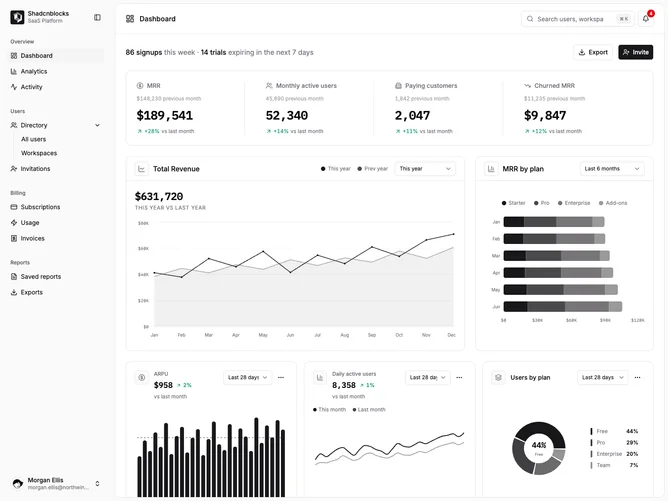
Dashboard1 is a full-page e-commerce analytics dashboard built with shadcn/ui components, featuring a collapsible sidebar on the left and a main content area containing stat cards, charts, and a pie chart breakdown. The sidebar has a logo, grouped navigation items with nested submenus, and a user account dropdown at the bottom. The main area includes a header with avatar, search button, and notification icon, followed by a welcome section with greeting text and date range selector. Below that are four stat cards showing key metrics with trend indicators, a horizontal bar chart for channel revenue, a composed area and bar chart for total revenue over time, and a pie chart showing product category breakdown.
The visual style uses a light card surface for the sidebar and content panels against a muted background. The sidebar has rounded corners when inset and includes subtle hover states on navigation items. Charts use a monochromatic color palette derived from the primary color with progressively lighter tints. Stat cards display trend arrows with semantic coloring for positive and negative changes. Typography is compact with small labels and medium-weight numbers.
This is a moderately complex dashboard with a conventional analytics layout. The sidebar navigation pattern with collapsible groups is common in admin interfaces. The chart combination of bar, area, and pie provides typical revenue analytics coverage. Complexity is primarily code-driven through the Recharts visualizations and sidebar state management. To populate this dashboard, you would need revenue data by channel, time series data for the composed chart, and category breakdown percentages.
Dependencies
| Package | Type |
|---|---|
| lucide-react | NPM |
| react | NPM |
| recharts | NPM |
avatar @shadcn | Registry |
button @shadcn | Registry |
chart @shadcn | Registry |
collapsible @shadcn | Registry |
dropdown-menu @shadcn | Registry |
input @shadcn | Registry |
sidebar @shadcn | Registry |
tooltip @shadcn | Registry |