
Navbar 18 block design & features
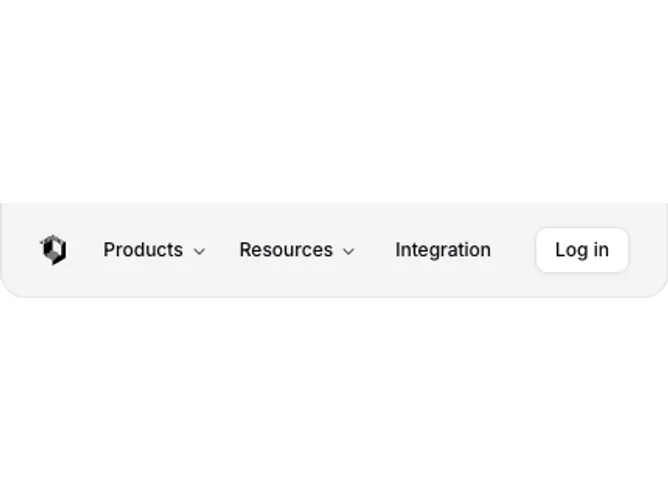
This navbar renders as a compact, centered pill that hangs from the top edge of the viewport. On medium screens and up it displays with rounded bottom corners, a border, and a muted background. The layout fits a small logo icon, shadcn/ui NavigationMenu triggers at 12px font size, and an outline Log in button all in a single tight row.
Dropdown menus for Products and Resources open as small rounded panels. The Products menu lists items in a single narrow column with a title and a two-line description in small text. The Resources menu uses a two-column grid at wider breakpoints. Each submenu item highlights on hover with an accent background swap. All text is set at 12px, giving the entire bar a miniature, toolbar-like proportion.
The color treatment keeps a muted fill on the bar itself with standard foreground text. Borders, rounded corners, and the small scale create an understated, floating-badge appearance. The logo uses a dark-mode invert filter for automatic theme adaptation. Spacing is tight throughout, with 2-unit padding on triggers and compact gap values.
On mobile the navigation menu hides and a hamburger icon opens a Shadcn UI popover aligned to the trailing edge. Inside, accordion items with indented border-left markers group the submenu links, and a secondary Log in button sits at the bottom of the popover content area.